
Independent advisors and consultants
Someone trusted you with a mandate. Your reputation is discretion and your income is the fee at the end. Both depend on a clean paper trail.
DealStrand · Advisory
Ask any advisor where the week goes: chasing a signature, chasing proof of funds, chasing the financials a seller promised a fortnight ago, and qualifying the same buyer for the third time. DealStrand Advisory keeps the mandate, the buyer qualification, the documents and the follow-up together, and records who you introduced, to whom, under which agreement.
Try it free for 7 days. Set up your workspace, load real deals and prepare every document. Sending and signatures unlock when you activate. Cancel any time before day 7 and you won't be charged.
Someone trusted you with a mandate. Your reputation is discretion and your income is the fee at the end. Both depend on a clean paper trail.
Names withheld until terms are agreed, disclosure released in stages. You need control over who sees what, and a record of when.
Seller mandates, listing agreements, qualified buyers, co-brokers and success-fee agreements, with the right information at hand when a buyer calls.
Buying and building your own deals? Explore Investment & Development
The seller's or buyer's brief lands in your pipeline by web form, import or by hand. The mandate or listing agreement, engagement terms and success-fee agreement are prepared from the record, ready to sign before you make a single call.
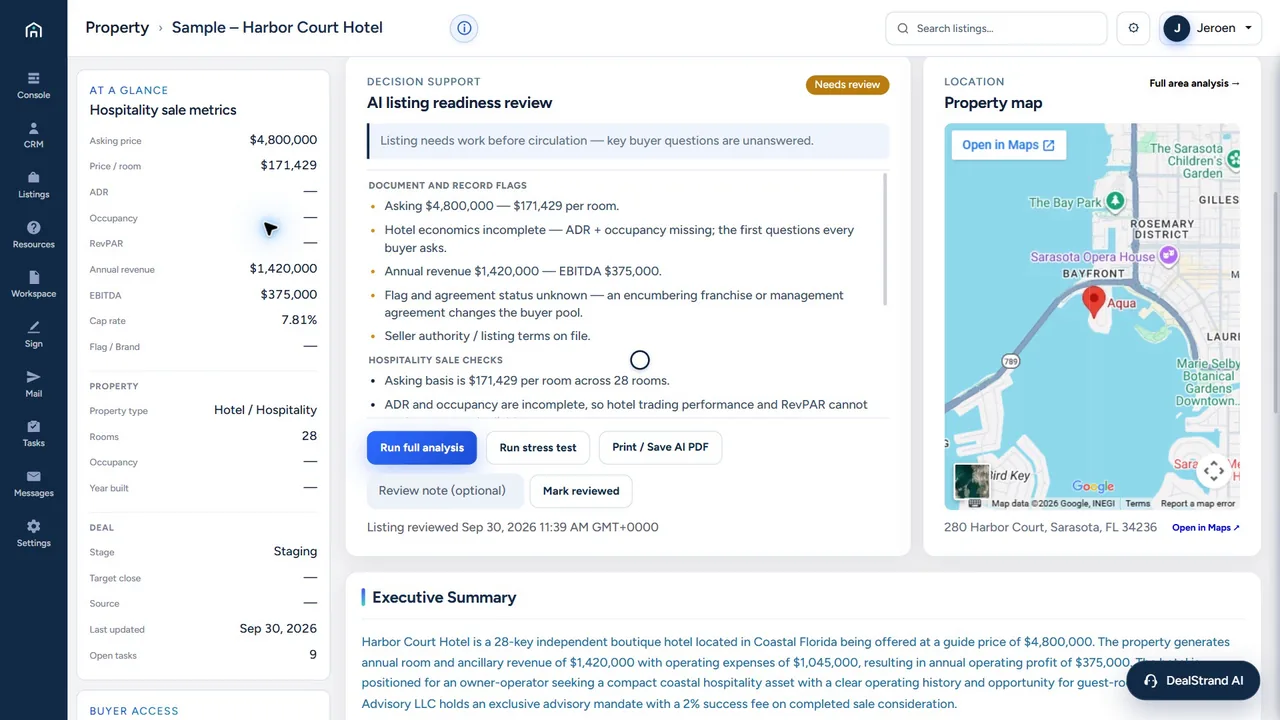
Brochures, rent rolls and financials are reviewed on arrival. Each mandate carries its status (Needs review, Reviewed, Re-analysis needed) so you know which ones are ready to market.
Sellers, buyers, investors and other intermediaries come in through your own intake forms. Identity, proof-of-funds status, intent and the capacity they act in sit on the contact; you review the evidence.
Share a teaser, collect the signed NCND, then decide when to grant full access. Access is set by you, per contact and property.
The signed NCND, the referral or co-broker agreement and the introduction notes stay with the mandate: who was introduced, when, under which terms and at what fee.
Offers and closing tasks run on the same record. At the end, the engagement terms, every fee and split agreement and the introduction record are one file, ready for your invoice.
NCND = Confidentiality & Non-Circumvention Agreement. Records support your position; they don't guarantee a fee or outcome.
Bring sellers and buyers in through your web forms; collect identity, authority, proof of funds and documents before releasing sensitive details.
Teasers and listings without handing over the whole file; fuller access after the NCND, when you decide.
The sellers and buyers you represent see the mandates and documents that concern them, under your brand; everything else stays private.
Referral partners and co-brokers work inside the relevant mandate, with their signed agreement and agreed fee or split attached.
Partners present listings and buyer needs from inside their portal, state who they act for and attach the mandate or proof of funds. Each one lands in your review queue, checked, before anyone else sees it.
Message one client or a selected group; every request stays with the opportunity.
Sell-side and buy-side mandates, listing agreements, engagement terms, NCNDs, co-broker, referral and fee agreements, mandate confirmations, KYC and letters of intent, filled from the record, reviewed by you and filed with the mandate. Have a scanned form from a lawyer or bank? Fill it from the data already in your workspace.
Pick the document; the data comes from the workspace.
Every filled field is shown for your confirmation.
Signature requests and packages go out from the workspace, with delivery recorded on the deal.
Signature requests: Professional and Firm.
Most deals reach you through a chain: the seller, the listing broker, a co-broker, the person who found the buyer. DealStrand puts every link in that chain on the record, with their authority and their fee agreed before anyone is introduced.
Sell-side mandates, listing agreements and engagement terms prepared from the record and signed before you go to market. The seller sees their mandate and the documents you've requested in their own portal.
Other brokers send opportunities and buyers through your intake forms and state who they act for: exclusive listing broker, co-broker, owner's representative or deal source. Anyone who claims a mandate uploads the listing agreement with the submission, and the AI checks the names and dates on it before it counts. The opportunity circulates only once that proof is on file, the owner is named and you've approved it.
Set the referral fee or co-broker split in each agreement, before the introduction. Where a partner's licence is on file you can record a commission share. You decide each partner's qualification, and fee claims stay with the mandate through to close.
Whether a fee can be paid as a commission depends on licensing where you and your partner work. DealStrand records the agreement; it doesn't give legal advice.
Answer the questions every buyer and lender will ask, before you circulate an opportunity or put a buyer in front of it.
Will a lender back your buyer?
Does the asking price hold up?
What will a buyer earn on their cash?
Built into the workspace, no spreadsheet needed. Your assumptions stay with the mandate, so the numbers you quote in the next conversation are the ones you checked. The calculators compare assumptions; they don't verify source figures or give investment advice.
AI on your terms
DealStrand AI reviews uploaded financials and brochures: facts extracted, inconsistencies flagged, a status on the mandate and a summary on the record. Ask it about any mandate from anywhere in the workspace. The judgement (who to trust and when to introduce) stays yours.
You hand it
You get back
Key facts extracted, gaps and contradictions flagged, and the mandate marked Needs review, Reviewed or Re-analysis needed, so you know what's ready to market.
You hand it
You get back
Occupancy and income checked against each other before you circulate the opportunity or put a buyer in front of it.
Example flag: rent roll and T-12 differ by $14,400 a year. Ask the seller before you circulate.
You ask it
You get back
An answer from anywhere in the workspace: what's still missing from the file, which documents are on record, and what the numbers say.
Three ways to run it
Built in. Uses the monthly AI credits included in your plan. Extra credit packs show their price before you buy.
Connect a supported AI provider key. Your provider bills you directly and your plan credits are left untouched.
Connect ChatGPT or Claude with your own account. You choose what it can read and change, you approve every message, and it can never pay, sign or delete.
AI helps review and prepare. It does not approve financing, investments, contracts or payments.
Clients, buyers, investors and referral partners sit next to the mandate, the NCND and the introduction that connects them, so DealStrand can run as your whole desk. Keeping your CRM? On Professional and Firm, mandate, referral and fee events go out as signed webhooks for Zapier or Make. Moving across? Import your contacts from a CSV export: you match the columns, preview every row, and nothing is saved until you confirm.

“For more than thirty years I've worked on deals across borders. I built DealStrand to run my own, and I still do, every day.”
Jeroen Reidel, Founder · Petronas International · Kerja Group · Why I built it →
Plans
Prices are in USD, before applicable tax. Annual billing is one full yearly charge after the trial, not twelve monthly payments. The comparison describes active paid plans.
Prepare and preview work internally, with 5 platform AI usage credits. External email, room invitations, public sharing, signature requests, clean document exports and outbound webhooks are locked during the trial. Activation unlocks only the features included in your selected plan.
A card is needed to start. Your first 7 days are free. Cancel any time before day 7 in Settings → Billing or the Paddle customer portal and you won't pay a thing. If DealStrand earns its place, your selected monthly or annual plan begins on day 8, plus applicable tax, and renews until you cancel.
Monthly billing selected.
Save $120 per year
Billed monthlyFor an independent advisor organizing mandates and follow-up
Free for 7 days. Cancel any time before day 7 and you won't be charged.
Save $240 per year
Billed monthlyFor advisory teams coordinating agreements and introductions
Free for 7 days. Cancel any time before day 7 and you won't be charged.
Save $360 per year
Billed monthlyFor advisory firms that need their own domain and branding
Free for 7 days. Cancel any time before day 7 and you won't be charged.
| Feature | Operator | Professional | Firm |
|---|---|---|---|
| Deal records & contacts | |||
| Documents & forms | |||
| Email & sharing on an active plan | |||
| Active rooms | 3 | Unlimited | Unlimited |
| Platform AI usage credits / month | 25 | 500 | 1000 |
| Native e-sign | |||
| Outbound webhooks | |||
| Own custom domain | |||
| Remove DealStrand branding | |||
| Priority support | |||
| Team seats | 1 | 3 | 10 |
Credits measure AI usage, not a fixed number of document reads. Request cost varies by model, input and output. Extra packs, when offered in your workspace, show their price before purchase. Your own provider key is billed by that provider instead.
Neither. Nothing you put here is published anywhere. It's your private desk for your mandates and the people you choose to introduce.
Yes. It's built for independent advisors, consultants, mediators and business brokers, licensed or not. It records your mandates, engagement terms, introductions and the fee agreed with each party. Whether a fee can be paid as a commission depends on licensing where you work; DealStrand records the agreement, it doesn't decide that for you.
A signed, timestamped record of who you introduced to whom, under which agreement. When someone tries to go around you, it's the difference between an argument and an invoice.
It supports your position; it doesn't guarantee payment.
You choose teaser or full access per contact and property, and collect signed agreements before releasing anything sensitive.
Set up your workspace, load real deals and prepare everything, with 5 AI credits. Sending, signature requests, portal invitations, public sharing, clean exports and webhooks unlock when you activate your plan.
It can. Import your existing contacts from a CSV export and they live next to the mandates they belong to. Or keep your CRM and route events to it through Zapier or Make on Professional and Firm.
No. It reads, extracts, flags and summarises, and logs every step. The decision is yours.
Plans include monthly AI credits; usage varies with the document and model. Or connect your own provider key and your provider bills you directly.
Yes. Import your contacts from a CSV export: you match the columns, preview every row, and nothing is saved until you confirm.
You keep ownership of your content. Export options and retention after cancellation are set out in the Terms.
TermsYour workspace is typically ready within hours of signing up. The invitation arrives by email.
Monthly or annual (annual is one yearly charge). Cancel anytime in Settings → Billing or the Paddle portal. See the Refund Policy.
RefundsTry it free for 7 days. Set up your workspace, load real deals and prepare every document. Sending and signatures unlock when you activate. Cancel any time before day 7 and you won't be charged.