
Principals and sponsors
You spot it, underwrite it, raise or place the capital, and when it goes wrong it's your phone that rings. You need one place where the whole story lives.
DealStrand · Investment & Development
Screen every opportunity against your buy box, let the AI read the offering memorandum and flag what doesn't add up, then carry the deal through financing, construction, operations and sale on one record, with the documents, people and next steps attached.
Try it free for 7 days. Set up your workspace, load real deals and prepare every document. Sending and signatures unlock when you activate. Cancel any time before day 7 and you won't be charged.
You spot it, underwrite it, raise or place the capital, and when it goes wrong it's your phone that rings. You need one place where the whole story lives.
Scopes, bids, draws, evidence, inspections, and a lender who wants proof before releasing a cent. You need the file ready before anyone asks.
Alone or with a few partners, keep the deal, the documents and the next steps on one record.
Bringing parties together instead? Explore Advisory
Most tools stop at closing. DealStrand keeps running the asset, on the same record.
Opportunities arrive by email, PDF, import or your own intake form and are scored against your buy box. You open the pipeline and see which deals deserve your afternoon.
The AI reads the offering memorandum, rent roll and T-12 and tells you where the numbers don't agree with each other. Built-in calculators test the assumptions. You verify and decide.
A borrower vault keeps your financials current; loan packages are assembled from it. Lender rooms show who opened what, so you stop wondering whether they've looked.
Lender rooms are shared on an active plan.
Contractor bid rooms, a scope-of-work engine and draw packages with invoices and photos attached. The lender's release question gets answered from the record, not a scramble through your phone.
Closing isn't the finish line. Each asset moves through onboarding, financial audit, capital planning, renovations, leasing, stabilisation and refinance-or-hold, with required tasks at every stage and the portfolio in one view.
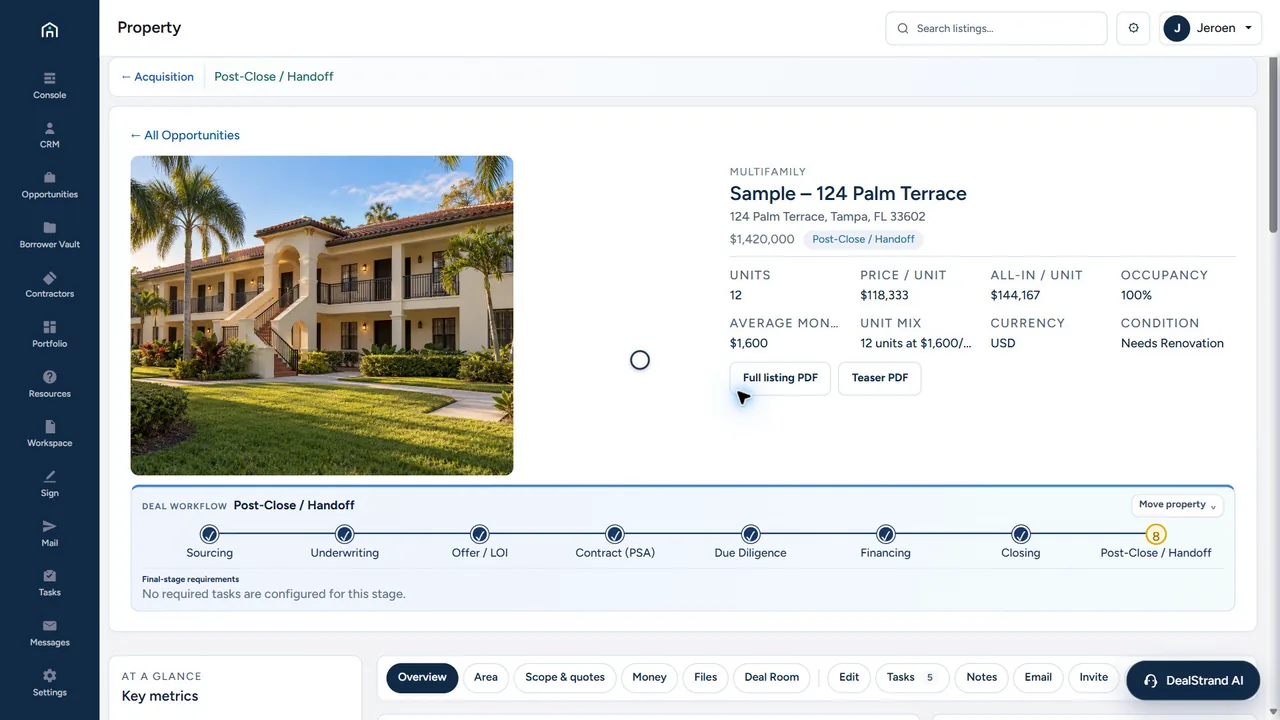
Generate a teaser or full listing PDF from the record and choose who gets teaser or full access.
Contractors, lenders, investors and clients each get access to the properties, documents and actions relevant to their role, under your brand, and nothing else.
Review scopes, submit bids, follow awarded work and upload invoices and photos against each item.
Review your borrower package, submit terms and request missing documents, all tied to the deal.
Choose teaser or full access per contact; share documents after you've reviewed who should receive them.
Message one contractor or the whole project group; questions and updates stay with the property.
Web forms collect borrower, investor and project information; participants upload what you request.
Every room records who opened what and when, so you know which lender or investor is engaged before you pick up the phone.
Each document is filled from the record, reviewed by you and filed against the deal. You never retype the same address into a fourth form.
Pick the document; the data comes from the workspace.
Every filled field is shown for your confirmation.
Signature requests and packages go out from the workspace, with delivery recorded on the deal.
Signature requests: Professional and Firm.
Calculators built into every deal record. Test the financing, the income and your return before you commit capital.
Can the property carry the loan?
Does the income support the price?
What do you earn on the cash you put in?
Built into the workspace, no spreadsheet needed. Your assumptions stay with the deal so you can revisit them as it develops. The calculators compare assumptions; they don't verify source figures or make investment decisions.
AI on your terms
Give DealStrand your buy box: asset type, markets, size, price band, the yield or cap rate you need, the leverage you'll accept. Forward the broker's email, drop in the offering memorandum, or upload a rent roll and T-12. It extracts the numbers, runs them through the calculators and flags the deal: worth a look, pass, or "these numbers don't agree." Every read and flag is logged. Nothing moves without you.
You hand it
You get back
Price, units, NOI, cap rate and unit mix on the record, a plain summary before you open the PDF, and every claim that doesn't match your other documents flagged.
You hand it
You get back
Occupancy, average rent and actual NOI, checked against each other and against the asking price.
Example flag: rent roll and T-12 differ by $14,400 a year. Review before you underwrite.
You hand it
You get back
A new opportunity with address, price and broker contact, scored against your buy box and waiting for your approval.
Three ways to run it
Built in. Uses the monthly AI credits included in your plan. Extra credit packs show their price before you buy.
Connect a supported AI provider key. Your provider bills you directly and your plan credits are left untouched.
Connect ChatGPT or Claude with your own account. You choose what it can read and change, you approve every message, and it can never pay, sign or delete.
AI helps review and prepare. It does not approve financing, investments, contracts or payments.
Contacts, lenders, contractors and investors live next to the deals they belong to, so DealStrand can run as your whole desk. Prefer to keep your CRM? On Professional and Firm, deal events go out as signed webhooks, and Zapier or Make route them into HubSpot, Zoho, Pipedrive, Salesforce, Follow Up Boss, Google Sheets or Slack. Moving from another CRM? Import your contacts from a CSV export: you match the columns, preview every row, and nothing is saved until you confirm.

“For more than thirty years I've worked on deals across borders. I built DealStrand to run my own, and I still do, every day.”
Jeroen Reidel, Founder · Petronas International · Kerja Group · Why I built it →
Plans
Prices are in USD, before applicable tax. Annual billing is one full yearly charge after the trial, not twelve monthly payments. The comparison describes active paid plans.
Prepare and preview work internally, with 5 platform AI usage credits. External email, room invitations, public sharing, signature requests, clean document exports and outbound webhooks are locked during the trial. Activation unlocks only the features included in your selected plan.
A card is needed to start. Your first 7 days are free. Cancel any time before day 7 in Settings → Billing or the Paddle customer portal and you won't pay a thing. If DealStrand earns its place, your selected monthly or annual plan begins on day 8, plus applicable tax, and renews until you cancel.
Monthly billing selected.
Save $240 per year
Billed monthlyFor an owner-operator preparing their next acquisition
Free for 7 days. Cancel any time before day 7 and you won't be charged.
Save $360 per year
Billed monthlyFor active teams coordinating financing and project execution
Free for 7 days. Cancel any time before day 7 and you won't be charged.
Save $600 per year
Billed monthlyFor firms that need their own domain, branding and integration support
Free for 7 days. Cancel any time before day 7 and you won't be charged.
| Feature | Operator | Professional | Firm |
|---|---|---|---|
| Deal records & contacts | |||
| Documents & forms | |||
| Email & sharing on an active plan | |||
| Active rooms | 3 | Unlimited | Unlimited |
| Platform AI usage credits / month | 25 | 500 | 1000 |
| Native e-sign | |||
| Outbound webhooks | |||
| Own custom domain | |||
| Remove DealStrand branding | |||
| Priority support | |||
| Team seats | 1 | 3 | 10 |
Credits measure AI usage, not a fixed number of document reads. Request cost varies by model, input and output. Extra packs, when offered in your workspace, show their price before purchase. Your own provider key is billed by that provider instead.
Set up your workspace, load real deals and prepare everything, with 5 AI credits. Sending, signature requests, portal invitations, public sharing, clean exports and webhooks unlock when you activate your plan.
A CRM remembers people. DealStrand puts every contact next to the deal they belong to (sourcing, underwriting, financing, execution and exit on one record) with the documents generated from it.
You invite them into a room or portal that shows what you released and nothing else. They never see the rest of your business.
No. It reads, extracts, flags and summarises, and logs every step. The decision is yours.
Plans include monthly AI credits; usage varies with the document and model. Or connect your own provider key and your provider bills you directly.
It carries the execution layer: underwriting, lender rooms, contractor bids, draws and asset operations.
Yes. Import your contacts from a CSV export: you match the columns, preview every row, and nothing is saved until you confirm.
You keep ownership of your content. Export options and retention after cancellation are set out in the Terms.
TermsYour workspace is typically ready within hours of signing up. The invitation arrives by email.
Monthly or annual (annual is one yearly charge). Cancel anytime in Settings → Billing or the Paddle portal. See the Refund Policy.
RefundsTry it free for 7 days. Set up your workspace, load real deals and prepare every document. Sending and signatures unlock when you activate. Cancel any time before day 7 and you won't be charged.